

Tips to improve Jira Service Desk workflow with Multiple Checklists
Who do the customers contact first in case they have problems with the IT service they are using? A service desk of course!
Who do the customers contact first in case they have problems with the IT service they are using? A service desk of course!

Many comparisons have been made to prove one tool’s superiority over the other or – on the contrary – to show distinctions that make each tool more or less useful in various use cases. Surely, Trello allows teams to organize their projects visually while Jira is unbeatable in its management structure – it can keep even large teams well-coordinated and on track.

We all admit it: project management and tasks tracking sometimes can be overwhelming. But the good news is that at some point in the past someone came up with the idea of project management tools.

Jira gives us an ability to log time spent on a particular issue directly to it. Thank to this we can fairly accurately see how time is being spent in our organization – thanks to built-in Jira reports or apps that allow enhanced time-based reports.

Not all things are either black or white, and the same story goes for Jira issues. If your only options were to mark the assignment either done or merely not, it wouldn’t speak the whole truth about how a workflow for a task looks like, wouldn’t it?

As with everything in this prone-to-forgetting universe, some crucial tasks that must be completed before marking a given issue as “done” will be forgotten once in a while. As you probably know, even the most detailed and thought through plan means little if not executed due to the faulty of human memory.

Checklists are said to be the key to a successful transformation of any business. A simple solution that is surprisingly effective in making our lives simpler and our work more productive.

Track the Definition of “Done” with Multiple Checklists for Jira – Atlassian Marketplace app! This guide explains how to achieve constant evolution in a project.
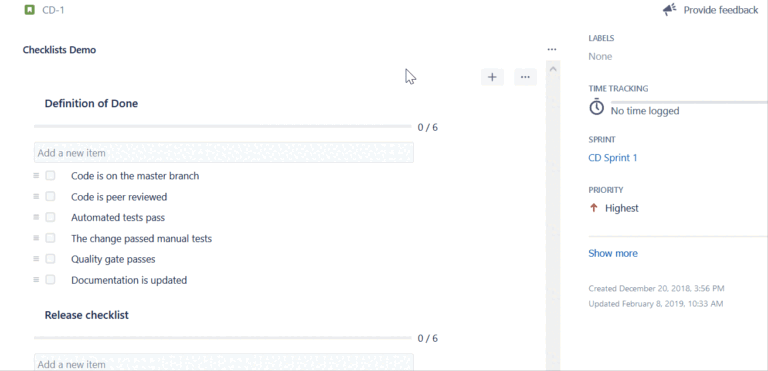
Automatically adding checklists to each new Jira issue is the desired functionality.
Multiple Checklists for Jira is a great tool that introduces Jira checklists into Jira issues. Rather than using bullet lists within the issue description or subtasks, you can now easily add multiple, actionable checklists and enhance your everyday workflow.